Simplex APOGEE User Manual Page 12

  • Download
  • Add to my manuals
  • Print
  • Page
    / 20
  • Table of contents
  • BOOKMARKS
  • Rated. / 5. Based on customer reviews
Page view 11
11
Digital Illumination
You will need to have some signal
showing on your scope to begin.
There is help getting started in a
section entitled "kick-starting
digital alignment" that follows.
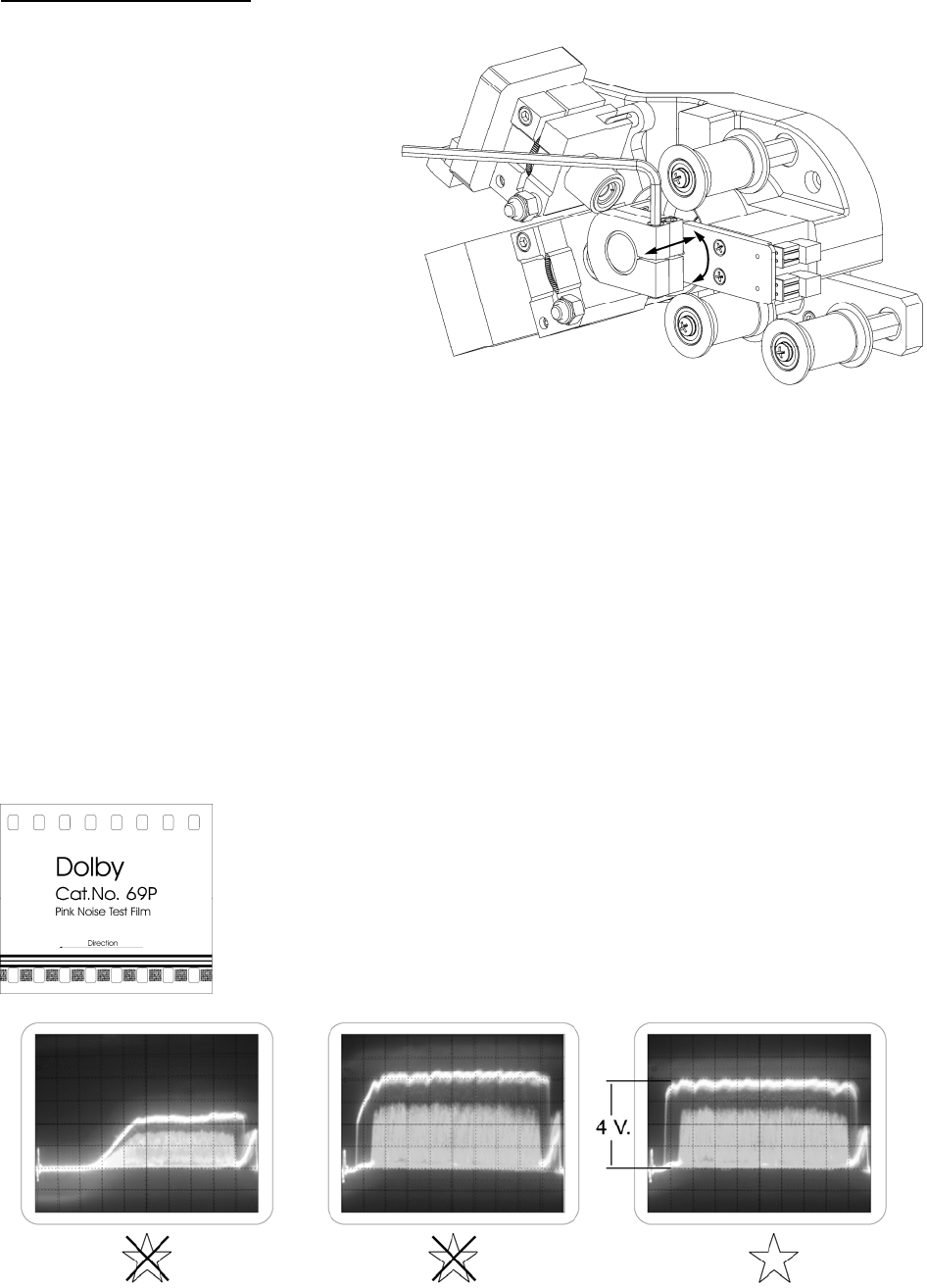
Use a 9/64" allen wrench to loose
n
the socket head cap screw enough
to permit moving the copper LED
mount by hand. Rotate the assemb
l
to achieve the highest traces. Mov
e
the assembly in and out to evenly
illuminate the entire digital block.
Pay close attention to the edges of
the digital burst. The desired patte
r
would be straight up the left side,
straight across the top and straight
down the right side. Some
unevenness will appear on the top
edge. Careful adjustment can
minimize this effect.
Tighten the screw when
adjustment is complete. Minimal
torque is required. The large
surface area makes excessive
tightening unnecessary. The last
step is to adjust the LED current
from the power supply to reach 4
volts of video.
Page view 11
1 2 ... 7 8 9 10 11 12 13 14 15 16 17 18 19 20

Comments to this Manuals

No comments